Asset Records
Organize the things you own with categories, status, purchase information, notes, and other useful details.
Voxel-EL helps you record personal assets, manage categories and status, build wishlists, review timelines, and better understand the cost of the things you own.
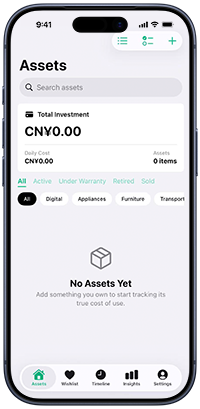
A lightweight way to keep personal asset information clear, searchable, and useful.
Organize the things you own with categories, status, purchase information, notes, and other useful details.
Save items you are considering, track planned purchases, and keep future spending decisions organized.
Review important changes and records in chronological order so the history of an asset is easy to follow.
View summaries and useful statistics to understand your asset structure and long-term usage costs.
Prepare and share asset data in CSV format when you want to back up, organize, or process your records elsewhere.
Manage your data with clear privacy information and export options designed to keep you in control of your records.
Quick answers for common Voxel-EL questions.
You can organize many types of personal assets, including digital devices, appliances, furniture, transportation-related items, and other belongings you choose to record.
Asset statuses help you distinguish between items that are active, under warranty, retired, or sold. The available options may vary by app version.
The Wishlist lets you save items you may want to buy later, keep planned purchases organized, and track progress before purchasing.
Yes. Voxel-EL includes tools to prepare and share asset data in CSV format. The destination is selected by you through your device's sharing options.
Please contact us by email and include your device model, operating system version, app version, and a short description of the issue. Screenshots are helpful when available.
You can read the full Voxel-EL Privacy Policy on the Privacy Policy page.
Contact the Voxel-EL support team for product questions, bug reports, privacy requests, or other assistance.